Prank Sounds: Haircut & Fart
- 4.1
- Rating
- 10.00M
- Installs
- Free
- Price

 Analysis by App-foxy
I downloaded Prank Sounds: Haircut & Fart expecting a small collection of silly noises, and that is exactly where this entertainment app makes the most sense. It is not trying to be a full game, a sound editor, or a social network. Its purpose is quick: choose a prank sound, prepare the moment, and play it when the timing feels right. I found that simplicity useful, although it also means the quality of the experience depends more on your imagination and the people around you than on deep app features.
The app is made by Hihoay.io and is available for free, with optional in-app purchases ranging from $0.99 to $37.99 per item. It has an Everyone age rating, so families can access it, but that does not mean every prank is appropriate for every situation. A burp or toilet sound may be funny among close friends and uncomfortable in a classroom, workplace, restaurant, or public setting. My first recommendation is to treat it as a timing tool, not as permission to interrupt people.
From choosing a sound to landing the prank
I find the appeal starts with how little setup a prank sound needs: choose an effect, then decide whether the moment can carry it. In this section, I focus on making that choice feel intentional rather than noisy, including a small rehearsal that helps avoid awkward volume surprises. From there, the next part follows the prank through its timing and handoff.
You May Also Like

 Blood Strike: 2.5 Anniversary
Blood Strike’s Loadouts Turn Every Drop Into a Tactical Gamble
A close look at Blood Strike’s custom loadouts: how fast access to signature weapons reshapes its battle royale rhythm, rewards preparation, and narrows the gap between fights.

 Pandora - Music & Podcasts
Pandora’s Music Is Easy to Start, but Harder to Recover
Pandora’s strength is its low-effort path from a seed to a station. Its weak spot is how much confidence it asks you to place in connection, setup, and quiet recovery.

 8 Ball Pool
 Is Built on Rivalries, Rematches, and Routine
A close look at the rivalries, rematches, shared routines, and unanswered safety questions that turn a quick pool match into a persistent mobile community.

 Samsung Music
’s Quiet Strength Is Playing What You Already Own
Its reach comes less from spectacle than from dependable access to a personal library. That simplicity is both the app’s strongest retention engine and its ceiling.

 AccuWeather: Weather Radar
AccuWeather Review: A Quick, Clear Forecast for Everyday Decisions
For everyday plans, the best forecast is the one you can understand quickly. AccuWeather makes rain timing, radar, and local conditions easy to act on, with a few trade-offs.

 Hill Climb Racing
Why Hill Climb Racing Still Turns Crashes Into One More Run
A tiny car, a bumpy hill and one more upgrade: Hill Climb Racing keeps resurfacing because its simple chaos makes every near-miss feel personal.
More From Our News Desk
View All News


Starting with the right kind of moment
The best use begins before opening the app. I would not reach for it when I need a long activity or a game to keep several people busy. I would use it when a conversation has a playful mood, when a friend is already joking around, or when I want to add a harmless sound effect to a private video or skit. That starting condition matters because the app gives you the sound, but it cannot judge whether the audience will enjoy it.
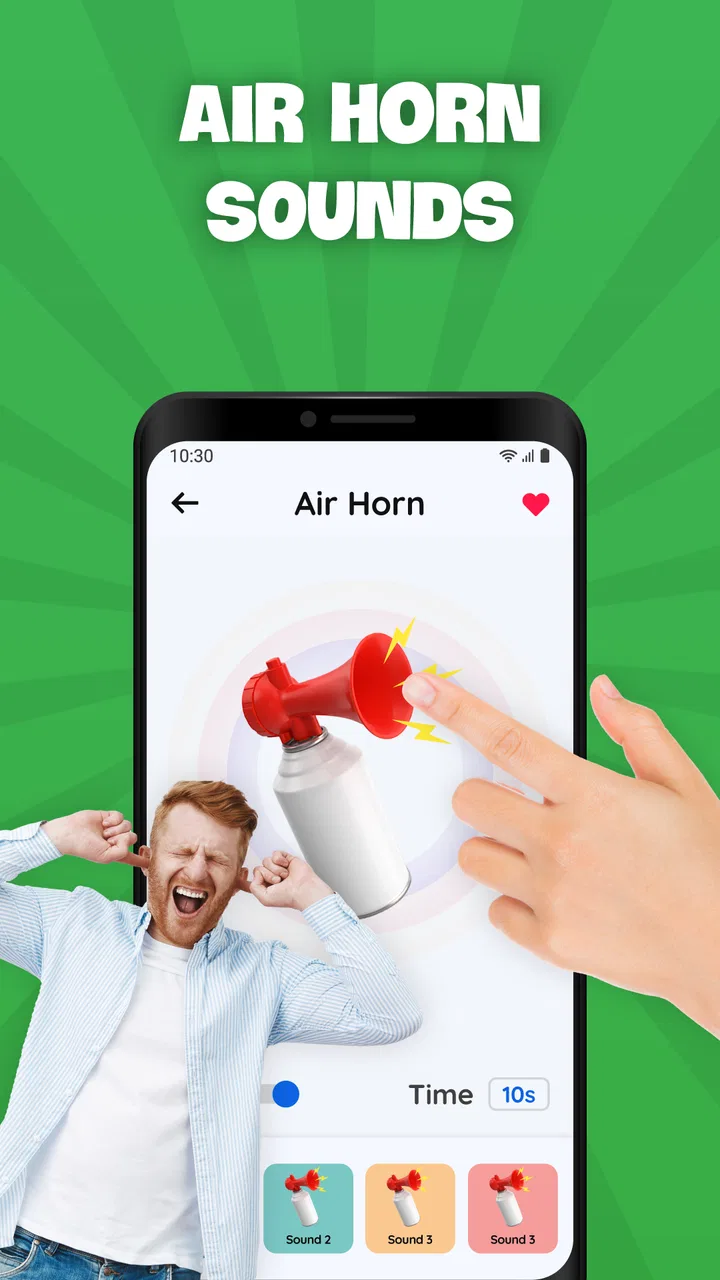
The collection focuses on familiar prank effects, including air horns, burps, toilet flushing, and hair clipper sounds. These choices cover different styles of joke. An air horn is loud and obvious, a burp is deliberately childish, a toilet flush works best as an absurd interruption, and the hair clipper effect depends on creating the impression that someone is about to get a surprise haircut. I would choose the effect according to the scene rather than simply tapping the loudest option.
For a realistic everyday scenario, imagine a friend sitting on the sofa while another person pretends to inspect their haircut. I would open the app beforehand, locate the hair clipper sound, keep the phone ready, and play it only when the conversation naturally reaches the fake haircut. The outcome is more convincing when the setup comes from the people involved, not from repeatedly pressing sounds at random.
Working through the selection step by step
My workflow is straightforward. I open the app, scan the available prank categories or sound choices, and decide what kind of reaction I want. Then I test the selected effect at a low enough volume to understand its character without startling everyone nearby. That small rehearsal is worthwhile: a sound that seems funny through a phone speaker can feel much harsher in a quiet room.
Next, I prepare the phone position. Holding it openly makes the joke obvious, while hiding it completely can make the situation awkward if someone notices. I prefer a natural handoff, such as keeping the phone beside me during a conversation or placing it where the sound can be heard without putting the device close to another person’s ear. The safest practical rule is to control the timing and the volume before the joke begins.
After that, I wait rather than firing the sound immediately. This is one of the less obvious lessons with a simple prank-sound app: the pause is part of the performance. If the effect follows a believable setup, it feels like a punchline. If it appears every few seconds, the app quickly becomes background noise. I got more value from using one carefully chosen sound than from cycling through the entire collection.
The final step is to stop once the reaction has happened. A short prank has a clear ending; repeated playback can turn a harmless joke into irritation. I also check the phone afterward so I do not accidentally leave a sound ready to play during an unrelated call or conversation. That habit is especially useful when moving between a private joke and a public setting.
Managing handoffs between people
This app works particularly well when the phone passes through several hands. One person can choose the effect, another can create the setup, and a third can play the sound at the right moment. That division makes the prank feel less mechanical, but it also introduces friction. Everyone needs to agree on the target and the boundaries before the phone changes hands.
I would avoid handing the device to someone who may press sounds indiscriminately, especially around children, strangers, or anyone who dislikes sudden noise. The Everyone rating describes the app’s general accessibility, not the social context of each prank. A sound effect can be harmless in content yet still be startling, embarrassing, or disruptive when used without consideration.
There is also a useful handoff for short-form creative work. If I were making a private comedy clip, I could have one person act, another hold the phone, and a third trigger the effect. The app is more practical for a quick live sound cue than for detailed production because the experience centers on immediate playback rather than editing a finished audio track. For polished videos, a dedicated editor would usually offer better control.
Another workable arrangement is to let the person being teased choose the sound. That removes much of the risk because the target has already accepted the joke. It also makes the app a small party prop rather than a tool used against someone. In my experience, consent changes the tone completely: the same hair clipper sound can be funny when everyone is participating and irritating when one person is singled out.
What the result feels like in practice
When the setup is good, the result is immediate and easy to understand. There is no complicated learning curve, and the recognizable effects do not need an explanation. This makes the app suitable for a quick laugh during a casual gathering, a playful fake haircut, or a simple sound cue in a home skit. I also like that the concept is accessible to people who would not want to learn a larger entertainment app.
The app’s public reception suggests that many people find this format worthwhile: it carries a 4.1 average from around 6.4 thousand ratings and has passed 10 million installs. Those figures do not guarantee that every sound will suit every listener, but they do indicate that the basic idea has broad appeal. I would still judge it by the situation rather than by popularity, since prank humor is unusually dependent on age, relationship, and setting.
For me, the strongest result is not the sound itself but the speed from idea to action. If I think of a hair clipper gag, I do not need to search through music or record an effect. If I want an absurd interruption, an air horn or toilet-flush sound is ready to support the joke. That convenience is the app’s real advantage over searching for individual audio clips online.
The weaker result appears when expectations become too ambitious. This is not a replacement for a soundboard designed for live performances, a recording studio, or a multiplayer game. If I want layered effects, precise cue points, custom audio, or a structured challenge, I would choose a different tool. Here, the reward comes from immediacy and recognizable humor, not technical depth.
Where the workflow breaks down
The first point of friction is social timing. The app cannot tell whether a person is working, studying, driving, resting, or simply not in the mood. A sudden air horn may be funny to one friend and genuinely unpleasant to another. I would skip prank playback around strangers, in formal environments, near sleeping people, and anywhere a loud interruption could create a safety problem.
The second limitation is repetition. A small set of familiar prank ideas can lose its effect quickly if the same group hears them over and over. I found it better to treat the sounds as occasional accents rather than as the main activity. If the group wants sustained entertainment, a party game or collaborative game will provide more variety and participation.
Purchases are another point to consider. The app itself is free, but optional items cost between $0.99 and $37.99 each. Before buying anything, I would use the free experience long enough to decide whether the available sounds already fit my needs. Someone who only wants one quick hair clipper or burp gag may have little reason to spend more, while a frequent prank-sound user may value additional choices if they find the collection worthwhile.
The version I reviewed is 34.0.0.0 and it supports devices running Android 7.0 or later. That makes it usable on many older Android phones, although the actual experience will still depend on the phone’s speaker, volume controls, and general responsiveness. A weak speaker can reduce the impact of a subtle effect, while a powerful speaker makes volume restraint more important.
Another break occurs when the phone is used as though it were invisible. A prank can fail because the screen is visible, the trigger is late, or the person notices the device being positioned. I would rehearse the hand placement and choose a moment when looking at the phone seems natural. If concealment becomes complicated, I would abandon the joke rather than make the interaction uncomfortable.
Who should use it and who should pass
I would recommend this app to people who enjoy brief, harmless jokes and want a ready-made collection of familiar sound effects. It is also a good fit for parents or friends planning a supervised skit, provided the participants understand the joke and the volume stays reasonable. The free entry point makes it easy to try without committing to a larger entertainment platform.
I would be more cautious recommending it to someone looking for sophisticated audio tools. A musician, video editor, streamer, or event host may need controls that a focused prank-sound app is not designed to provide. In those cases, a proper soundboard, audio editor, or media-production app would be the better alternative. Likewise, anyone who dislikes toilet humor, burps, or surprise noises may find the theme too narrow.
The age rating of Everyone makes the app broadly approachable, but I would still supervise younger users when they are playing loud effects around siblings, pets, neighbors, or other people. The content may be simple, yet the way it is used can create conflict. Teaching children to ask before startling someone is more important than finding the funniest button.
My final take after using the complete workflow
Hihoay.io has kept the concept focused: select a recognizable prank sound, arrange a believable setup, trigger it, and stop at the right moment. I appreciate that directness. The app does not require much explanation, and it can turn an ordinary interaction into a quick joke when the audience is receptive.
My honest reservation is that the app supplies the effect but not the judgment. Its success depends on volume, timing, consent, and knowing when to move on. The optional purchases also deserve attention because a free download can become less simple if you start collecting items without deciding what you actually need.
Overall, I would keep Prank Sounds: Haircut & Fart installed for occasional private jokes, especially the fake haircut scenario and other short setups where one sound is enough. I would not use it as a main party game or as a substitute for professional audio software. If you want a quick, accessible way to add air horns, burps, toilet flushes, hair clipper effects, and similar comic cues to the right moment, it does that job well. Use it sparingly, involve the people around you, and the simplicity becomes a strength rather than a limitation.
FAQs for Prank Sounds: Haircut & Fart
01What is Prank Sounds: Haircut & Fart and how does it work?
Prank Sounds: Haircut & Fart is a fun application designed to entertain users with a variety of humorous sound effects. The app includes sounds like hair clippers buzzing and fart noises. Users can play these sounds to prank friends or create funny situations. It’s easy to navigate and offers an intuitive interface for selecting and playing different sounds.
02Is Prank Sounds: Haircut & Fart free to download?
Yes, Prank Sounds: Haircut & Fart is free to download on both Android and iOS platforms. However, while the basic version is free, there may be in-app purchases or ads within the app. These can be used to unlock additional sounds or remove advertisements for an enhanced experience.
03Can I use Prank Sounds: Haircut & Fart offline?
Yes, one of the convenient features of Prank Sounds: Haircut & Fart is its ability to function offline. Once the sounds are downloaded onto your device, you can access and play them without needing an internet connection. This makes it perfect for pranking on the go, without worrying about connectivity.
04Is Prank Sounds: Haircut & Fart safe for all ages?
Prank Sounds: Haircut & Fart is generally safe for all ages, as it primarily consists of harmless sound effects. However, parents should be aware that some sounds might be considered inappropriate or annoying in certain settings. It’s advisable to monitor usage for younger children to ensure the app is used in a suitable manner.
05Does Prank Sounds: Haircut & Fart require any special permissions?
Prank Sounds: Haircut & Fart may request permissions such as access to your device’s storage to save and retrieve sound files. It might also ask for permission to use your microphone if there’s a feature for recording custom sounds. Always review the permissions requested during installation to ensure you are comfortable with them.
Pros
- Wide variety of prank sounds.
- User-friendly interface.
- Regular updates with new sounds.
- Customizable sound settings.
- Offline functionality available.
Cons
- Ads can be intrusive.
- Limited free sounds.
- Some sounds lack realism.
- No sound recording option.
- Requires in-app purchases for extras.

Prank Sounds: Haircut & Fart
Gallery